What's in it
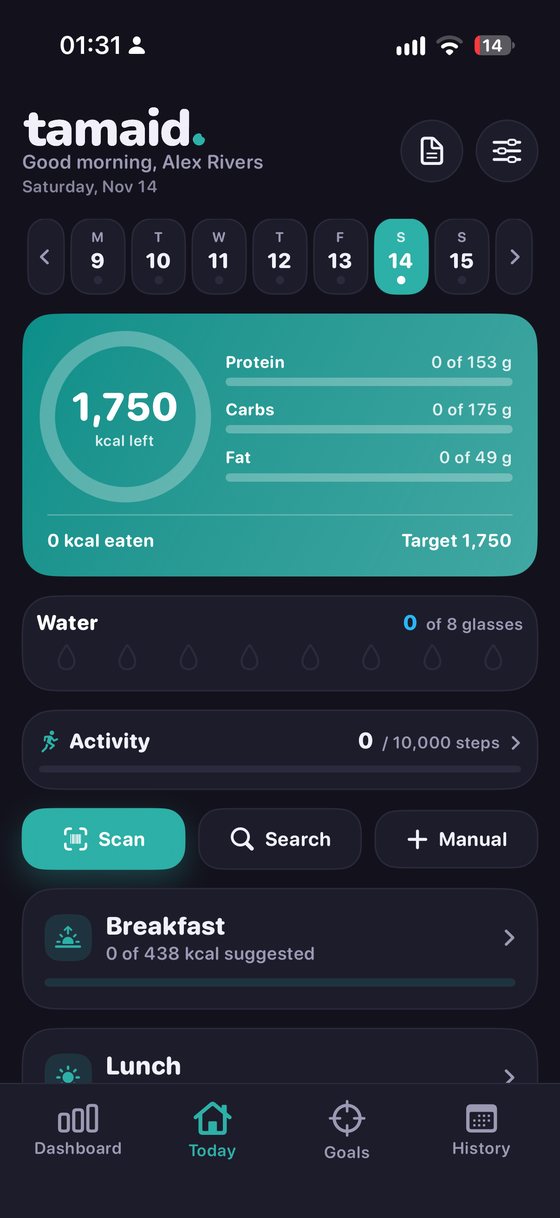
Everything Tamaid does today, and where to find the settings.
Logging a meal
Everything goes into the same diary, split into meals you can rename.
- Scan a barcode to see the product with its Nutri-Score and allergens, from Open Food Facts
- Search by name. Foods you've logged before come first, then live results when you're online, then the foods on your phone
- Describe a whole meal in plain words and it's split into foods for you
- Type it in when you know the numbers
- Copy a previous day when you're eating the same thing again
- Favourites, saved meals, your own foods, and recipes built from ingredients
Describing a meal
Type a sentence and Tamaid turns it into separate foods with sensible portions. You can change anything before you save.
- Sizes from small to very large change the portion
- Counts work: “two slices” doubles it, “three” triples it
- Spoonfuls of oil, butter, sauces and dressings are picked up too
- Drinks understand pints, glasses, cans, bottles, shots and exact amounts like 300 ml
- Anything it doesn't recognise gets looked up in the live food database when you're online
It knows UK food names best for now.
You type
half a pint of milk with two slices of toast
You get
Other drinks it knows
A pint is the UK pint, 568 ml.
Your calorie target
Answer a few questions and Tamaid works out a daily calorie target, split into protein, carbs and fat. Change it whenever you like. Past days keep the target they had.
- It uses the Mifflin-St Jeor formula. That's a rough estimate, not medical advice
- Workouts can raise your daily target if you want them to, from the day you turn that on
- If you'd rather not see numbers, Food diary only hides targets and weight tracking
In Settings
Weight and goals
Set a goal weight and see how it's going.
- Start weight, target weight and how far along you are, as a percentage
- Your weekly pace against the pace you planned
- The last 14 days of weight and average calories side by side
- More than one weigh-in a day is fine
- Scale readings can come in from Apple Health if you allow it
- After a break, a gentle note asks for a fresh starting weight and recalculates
What the Goals tab covers
Fasting
If you do something like 16:8, the timer shows how far into your fast you are. It can follow a weekly schedule and remind you when a fast starts or ends.
- Goals stay between 8 and 24 hours
- No streak badges, and nothing nudging you to beat a record
- Fasting isn't right for everyone. If you're pregnant, breastfeeding or have diabetes, Tamaid asks you to talk to a doctor first
Example: a 16 hour goal
Water and steps
Count glasses of water against a goal you set, and see your steps for the day. You can switch either off.
- A water tracker with your own daily goal
- Steps, workouts and weight from Apple Health, only if you allow it
- You choose which apps and devices count as workout sources
In Settings
Dashboard and history
Pick and reorder the widgets on your Dashboard so it shows what you care about. History lets you open any past day to see what you logged.
- A Dashboard you arrange yourself
- A calendar of past days, each opening to its full log
- An optional streak card, and an optional celebration when you finish a day
- A “Done logging” mark for days you've finished
In Settings
Labels and allergens
Scanned products come with the Nutri-Score and allergen details held by Open Food Facts. You can also list foods you avoid and get a warning when one turns up.
- Warnings for the foods you choose to avoid
- Open Food Facts is built by volunteers and recipes change, so check the packaging when it matters
In Settings
Making it yours
The look and the details are up to you.
- Dark or light, with your own accent colour
- Text size can follow your phone's setting if you switch that on
- Kilograms or pounds, centimetres or feet and inches, grams or ounces
- UK or US dates, and weeks starting on Monday or Sunday
- Rename or hide breakfast, lunch, dinner and snacks
- Choose which country's foods to search
Reminders
They're off until you allow them. After that you choose which ones you want, like logging your food, recording your weight or a fast starting.
In Settings